
How Custom Labels Can Boost Your Google Shopping Campaigns

Custom labels are a useful tool in Google Shopping campaigns that can help ecommerce businesses increase their visibility and sales. By assigning labels to products, you can organise and optimise your campaigns in various ways, such as bid adjustment, product grouping, reporting, and exclusions. To use custom labels, you need to understand the different types of labels available, assign them to your products, and use them to optimise your campaigns. Custom labels are a great way to improve the profitability and visibility of your ecommerce business on Google Shopping.
As an ecommerce business, you know that Google Shopping can be a great way to increase visibility and drive sales. But did you know that using custom labels can take your campaigns to the next level? In this guide, we'll walk you through the steps to set up custom labels and show you how to use them to optimise your Google Shopping campaigns.
What are Custom Labels?
Custom labels are a way to create smarter Google Shopping campaigns.
Adding custom labels will help you to organise the campaigns by the various attributes that are important to you as a retailer. The custom labels are only visible internally and are for your own use in campaign optimisation activities.
Custom labels will vary based on industry characteristics or your specific business type. Some common examples of custom labels are ‘seasonal’, ‘selling rate’, and ‘margin’. The labels you choose can play an important role in helping you to monitor and bid in your campaigns.
How to use custom labels
To use custom labels, you will first need to create them in your Google Merchant Center account. Once created, you can then add them to your product feed.
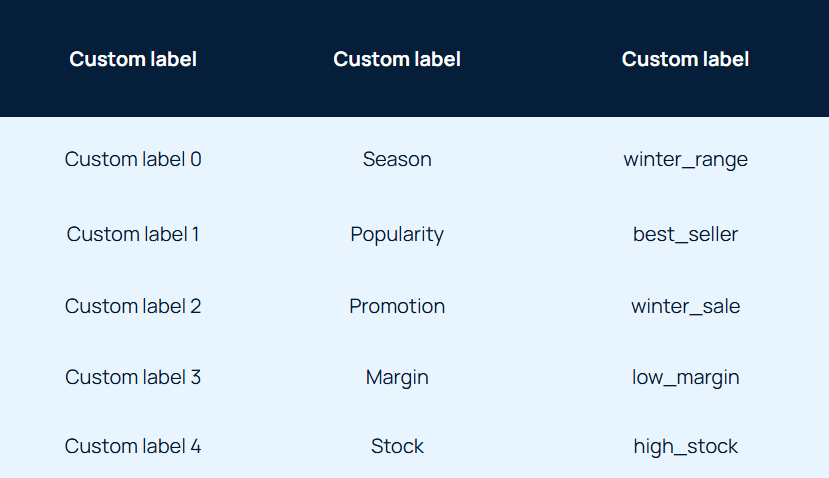
Google allows you to create up to five custom labels in your product feed, from 0 to 4. For each product, each of those labels can only have one value. A good practice is to use them consistently using the same five labels across your Merchant Centre account.
Your custom labels might look like the following example. Each label has a specific definition, supported by possible values:
How to use custom labels to target your ads more effectively
Once you’ve added custom labels to your product feed, you can then use them to segment your products. This means that you can group your products together based on the custom labels that you have assigned to them. For example, you could create a segment for all of your products that are high in stock or best sellers.
Here are some ways that you can use custom labels to boost your Google Shopping campaigns.
Seasonality
Let’s say for example you sell camping and outdoor equipment. Whole ranges of products will sell better in summer, and others during the winter months. With this in mind you can add season-specific labels to your products to increase bids when they’re in-season and reduce the bids when there’s less demand.
Price point
This is particularly important for retailers with both low-price and high-ticket items. To maintain a high ROAS, your maximum CPC for lower priced items needs to be much lower than that of the higher cost items.
Although Google does not allow you to segment your products by price, custom labels will allow you to manage your bids by a generic price range. For example, you would be able to allocate a maximum CPC of 50p to all your products under £50, whilst products £51-100 are allocated a maximum CPC of £1.00.
Performance
You may find setting out your bids more straightforward by segmenting your products by performance. This way you can focus more budget on best-selling products, and save on less frequently purchased items.
Profit margins
Similar to segmenting by price point, you use this label to separate products based on the profit margin. While you may sell two different items for the same price, they might have considerably different profit margins.
In order to bid more accurately, you may find it helps to separate your high-margin products from your low-margin products.
Promotions
It’s also possible to divide up your inventory by their promotional status, assigning a ‘clearance’ value for items on sale. This allows you to focus your marketing strategy on items you’re possibly looking to sell fast to make space for new stock.
Stock availability
Most retailers are selling products that come with a range of variants, such as colour and size for those in the fashion industry. Adding the stock availability into a custom label will allow you to analyse and bid more precisely, to help ensure that you sell all product variants – not just the most popular ones.
How to use custom labels to target your ads more effectively
Step 1. Define your custom labels
For example, you might want to define custom label 0 as “margin”, custom label 1 as “season”, custom label 2 as “selling rate”, and so on.
Step 2. Assign values
The values for “season” would be “Spring”, “Summer”, “Autumn”, and “Winter”, whereas suitable values for “margin” would be “LowMargin” and “HighMargin”.
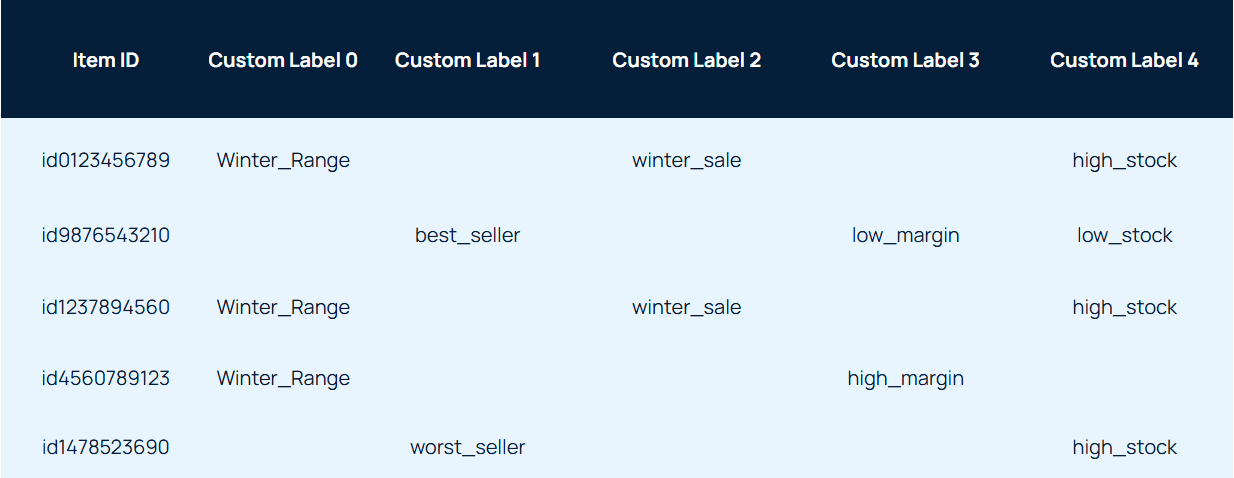
Step 3. Add your custom labels to the product feed
It may be a bit time-consuming, but by applying your new custom labels to your product range you will be able to review and adjust your bidding strategy for items in different product groups. The end product will look something like this:
Understanding how your products vary according to these attributes will enable you to create custom labels to organise your product range before feeding it into Google Shopping.
Conclusion
Using custom labels is a smart way to optimise your Google Shopping campaigns. By assigning labels to your products and using them to adjust bids, group products, and track performance, you can improve the visibility and profitability of your ecommerce business. Don't be afraid to experiment with different custom label strategies to find the best approach for your business.
Stopped growing online?
We know how to fix that.
We start with your data, not your channels.
Commercial, market, performance, customer and behavioural data, woven into one view rather than five separate reports.
It shows where your profit comes from, which activities earn their place, which are dead weight, and what's worth doing next.
We typically find 15-30% in wasted marketing spend in the first 3 months.
Channels are the tools; making your business more money is the objective.
Latest News
See all.jpg)
Black Friday Measurement Guide
Good Black Friday ROAS doesn't mean money in the bank. How to set the goal, track MER through peak and review what new customers are worth.


Black Friday Landing Page Guide
More Black Friday traffic won't fix a leaky journey. How to build the sale page, clear conversion blockers and fix checkout before you buy more clicks.
Black Friday Ads Guide
Spending more over Black Friday isn't the only way to grow. How to reallocate budget, structure Meta and Google, and plan creative for peak.